
Free & open source • MIT licensed • Python 3
Pybaseball – Access Baseball Data Easily
pybaseball is an open-source Python package that collects baseball data from Baseball Savant, FanGraphs and Baseball Reference and hands it back as pandas DataFrames. This independent guide covers the pybaseball download, installation, the main functions and fixes for the errors people run into most.
pip install pybaseballLatest PyPI release: 2.2.7 (8 September 2023) · Maintained on GitHub by Moshe Schorr, created by James LeDoux.
MIT License
Free for personal and commercial use
PyPI version 2.2.7
Released 8 September 2023
≈1.7k GitHub stars
jldbc/pybaseball, checked Oct 2026
Python 3.8 – 3.11
Versions listed in setup.py
pandas DataFrames
Every call returns tabular data
WHAT IS PYBASEBALL
A Python library that does the baseball data scraping for you
Baseball analytics data is spread across several websites, each with its own format. pybaseball wraps those sources in plain Python functions. You ask for Statcast pitches between two dates, a season of FanGraphs pitching stats or a team’s 1927 schedule, and the package fetches the page, parses it and gives you a DataFrame.
It was written by James LeDoux, is maintained by Moshe Schorr and was inspired by Bill Petti’s R package baseballr. The project lives on GitHub as jldbc/pybaseball.
- Pitch-level Statcast data from Baseball Savant
- Season and date-range batting and pitching stats
- Standings, schedules, game results and awards data
- Player ID lookups across MLBAM, FanGraphs, Baseball Reference and Retrosheet
Note: pybaseball.com is an independent guide. It is not run by the pybaseball maintainers, MLB, FanGraphs, Baseball Reference or Baseball Savant.
FEATURES
Nine things pybaseball does well
Each feature maps to real functions documented in the project’s README and docs folder.
Statcast pitch data
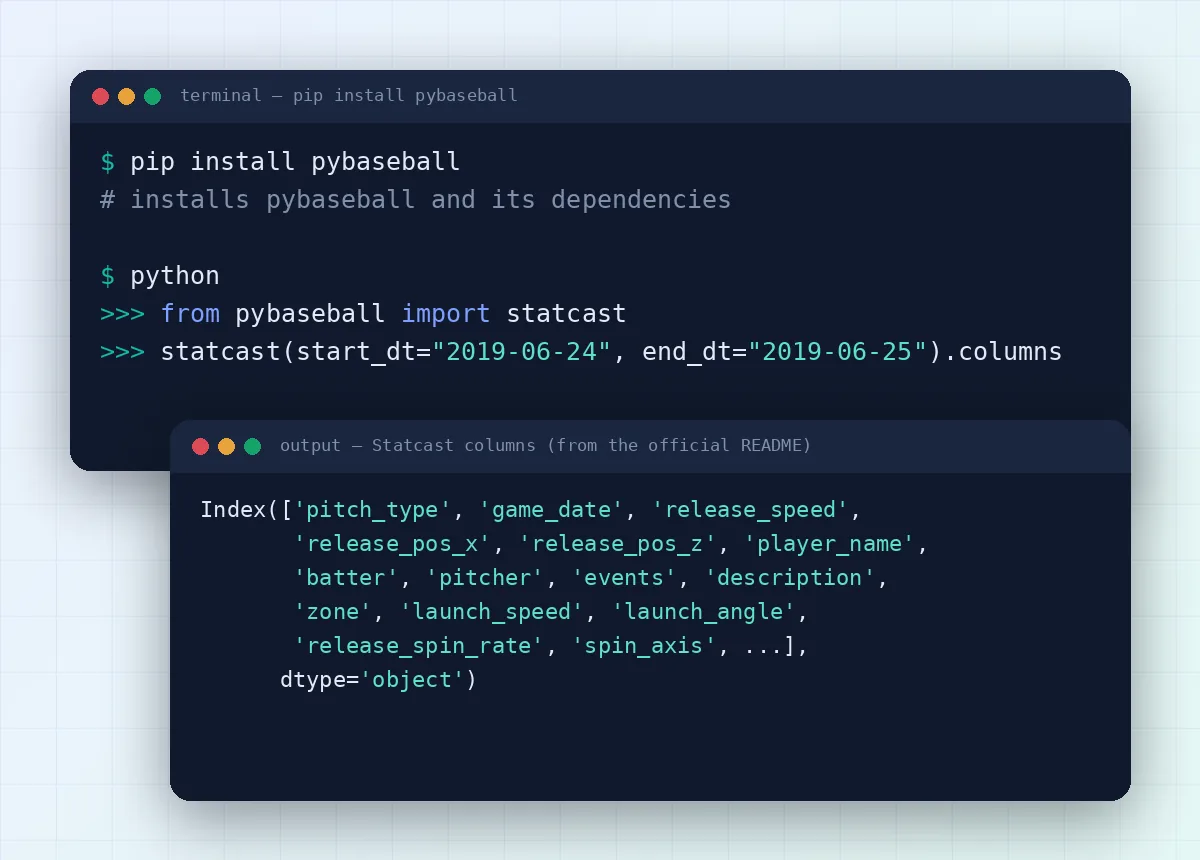
statcast() returns every pitch between two dates from Baseball Savant: velocity, spin rate, launch speed, launch angle and dozens more columns.
Player-level Statcast
statcast_pitcher() and statcast_batter() filter the same data to one player using their MLBAM ID.
FanGraphs season stats
pitching_stats() and batting_stats() pull league-wide season data, one row per player per season.
Custom date ranges
batting_stats_range() and pitching_stats_range() pull Baseball Reference stats for any window, in YYYY-MM-DD format.
Player ID lookup
playerid_lookup() matches a name to MLBAM, Retrosheet, Baseball Reference and FanGraphs IDs using the Chadwick Bureau register.
Standings and schedules
standings() returns one DataFrame per division; schedule_and_record() gives a team's game-by-game results.
Historical databases
Access to the Lahman database and Retrosheet data for seasons that predate Statcast tracking.
Optional local cache
Turn on cache.enable() to save results to disk, so repeated queries load faster. It is off by default.
pandas-ready output
Results come back as pandas DataFrames, so you can filter, group, plot or export them with tools you already know.
SYSTEM REQUIREMENTS
What you need before you install pybaseball
| Requirement | Details |
|---|---|
| Python | Python 3. The package classifiers list 3.8, 3.9, 3.10 and 3.11 |
| Package manager | pip (or pip inside a virtual environment) |
| Operating system | Any system that runs Python 3: Windows, macOS or Linux |
| Internet | Required. Data is fetched live from the source websites |
| Installed dependencies | numpy, pandas, beautifulsoup4, requests, lxml, pyarrow, pygithub, scipy, matplotlib, tqdm, attrs |
| Memory | Depends on the query. A full Statcast season is 700,000+ pitches |
| Disk space | Small for the package; more if you enable the local cache |
pip installs the dependencies automatically. The list above comes from the project’s setup.py; the newest GitHub code also adds curl_cffi.
PYBASEBALL DOWNLOAD
Download pybaseball from the official sources
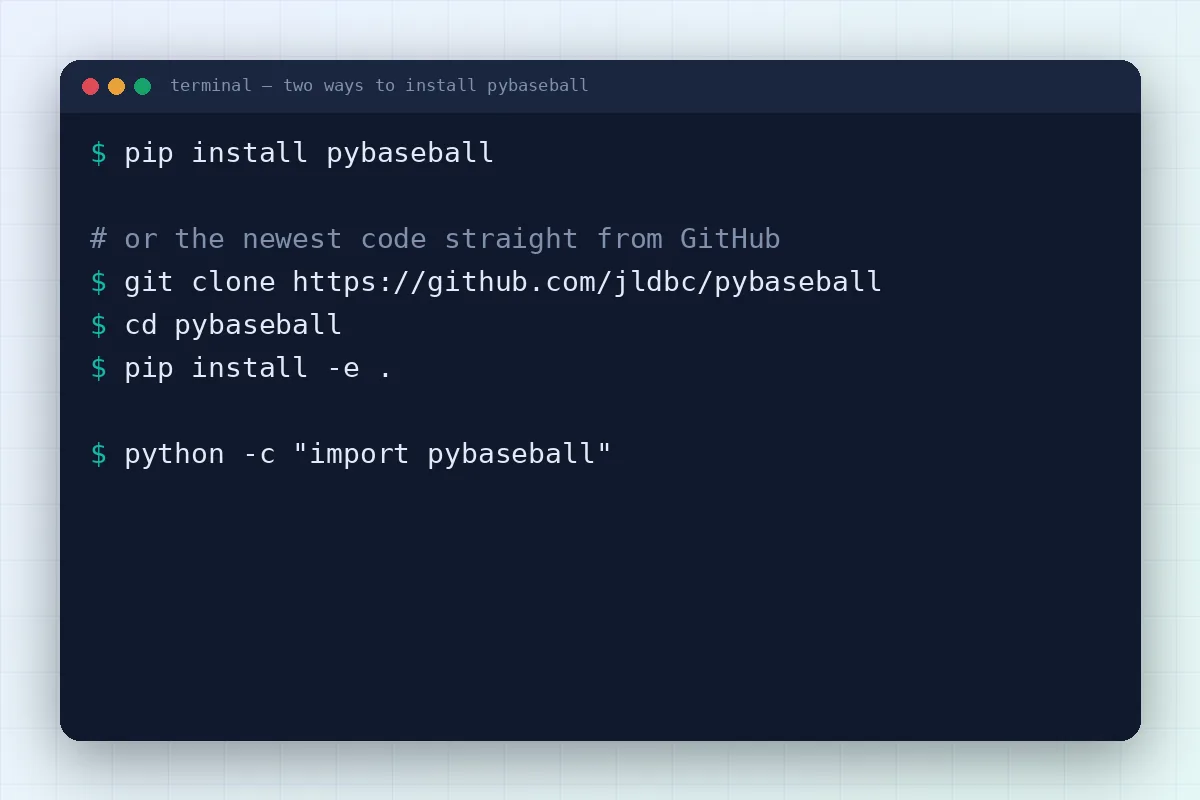
pybaseball is a Python package, so there is no .exe or installer to download. You install it with pip from PyPI, or you clone the source code from GitHub. Both are free and come from the project itself.
pip install pybaseballPackage details
- Version: 2.2.7 (latest on PyPI)
- Released: 8 September 2023
- Author: James LeDoux · Maintainer: Moshe Schorr
- License: MIT (open source)
- Platform: cross-platform, needs Python 3
- File size: see the Download files tab on PyPI
- Official source: github.com/jldbc/pybaseball
The GitHub repository can be ahead of PyPI. The README notes that releases may lag behind the code.
INSTALLATION
How to install pybaseball in five steps
Follow the timeline from top to bottom. The whole process usually takes a few minutes, most of it spent downloading dependencies.
01
Check your Python version
pybaseball needs Python 3. Open a terminal (Command Prompt or PowerShell on Windows) and check what you have.
python --version02
Create a virtual environment
A virtual environment keeps pybaseball and its dependencies separate from other projects. Activate it before installing.
python -m venv .venv
# Windows
.venv\Scripts\activate
# macOS / Linux
source .venv/bin/activate
03
Run pip install pybaseball
This pulls the latest PyPI release and every dependency, including pandas and numpy.
pip install pybaseball04
Optional: install from GitHub
Need a fix that hasn’t reached PyPI yet? Install the repository version instead.
git clone https://github.com/jldbc/pybaseball
cd pybaseball
pip install -e .
05
Test it with a first query
Import the package and pull a small date range. A DataFrame back means everything works.
from pybaseball import statcast
data = statcast(start_dt="2019-06-24", end_dt="2019-06-25")
print(data.shape)
Prefer a longer walkthrough with screenshots of each step? Read the full pybaseball installation guide.
HOW IT WORKS
From one line of Python to a ready-to-use table
pybaseball sits between your code and the public baseball websites. Here is the path every request takes.
You call a function
For example statcast(start_dt, end_dt) or pitching_stats(2014, 2016).
pybaseball picks the source
Statcast calls go to Baseball Savant, season stats to FanGraphs, ranges and schedules to Baseball Reference.
The data is fetched and parsed
The package downloads the response and cleans it into rows and columns using requests, BeautifulSoup and lxml.
You get a DataFrame
A pandas DataFrame lands in your session, ready to filter, chart or save as CSV.
HOW PYBASEBALL WORKS
Under the hood: parallel calls, caching and player IDs
Large Statcast pulls run in parallel
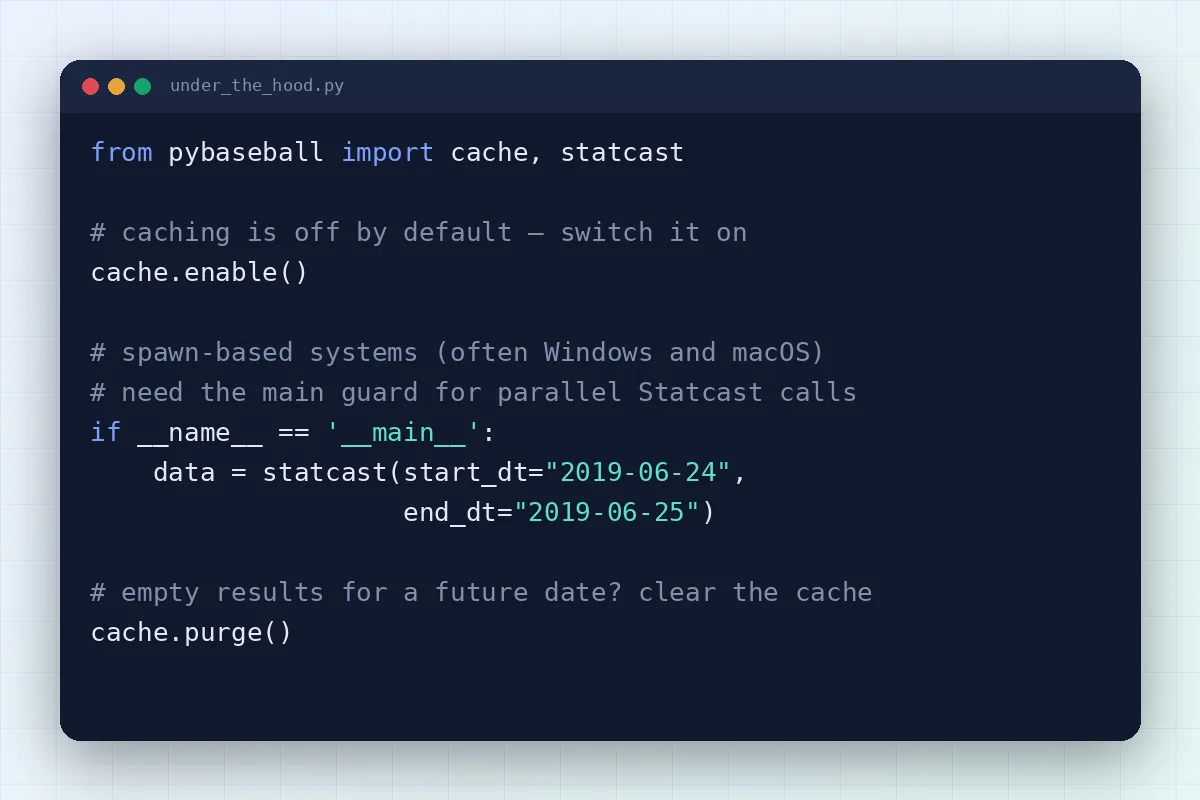
Big date ranges are split into smaller requests. On spawn-based systems (often Windows and macOS) you may need to wrap the call in if __name__ == '__main__': to avoid a BrokenProcessPool error.
Caching is opt-in
Out of the box nothing is written to your drive. Call cache.enable() and results are stored under .pybaseball/cache in your home folder, or wherever PYBASEBALL_CACHE points.
IDs connect the sources
Each site uses its own player IDs. The Chadwick Bureau register behind playerid_lookup() links MLBAM, FanGraphs, Baseball Reference and Retrosheet keys so you can join tables.
COMPATIBILITY
Where pybaseball runs
pybaseball is pure Python code that runs wherever Python 3 does. It is a library, not a desktop app, so there is no separate Windows, Mac or Linux build.
| Environment | Status and notes |
|---|---|
| Windows 10 / 11 | Supported. Use a main guard for large Statcast pulls |
| macOS | Supported. Same main-guard note as Windows |
| Linux | Supported. System Python 3 or a virtual environment |
| Jupyter / Google Colab | Supported. Run the pip install command in a cell |
| Python 3.8 – 3.11 | Supported. Listed in the package classifiers |
| Python 3.12+ | Not listed. Test in a virtual environment first |
| Python 2 | Not supported. The package targets Python 3 |
PROS AND CONS
The honest pybaseball review
Pros
- Free and MIT licensed
- One consistent API for Statcast, FanGraphs and Baseball Reference
- Returns pandas DataFrames you can use straight away
- Player ID lookup links sources together
- Optional cache for repeated queries
- Active GitHub repository and community Discord
Cons
- Depends on third-party sites, so layout changes can break a scraper
- PyPI releases can trail the GitHub code
- Large Statcast ranges take time and memory
- No graphical interface; you need some Python
- Statcast numbers can be revised by the source, even for past seasons
USE CASES
Six ways people put pybaseball to work
From quick fantasy checks to full research projects, these are the common reasons to reach for pybaseball.
Pitch analysis and scouting
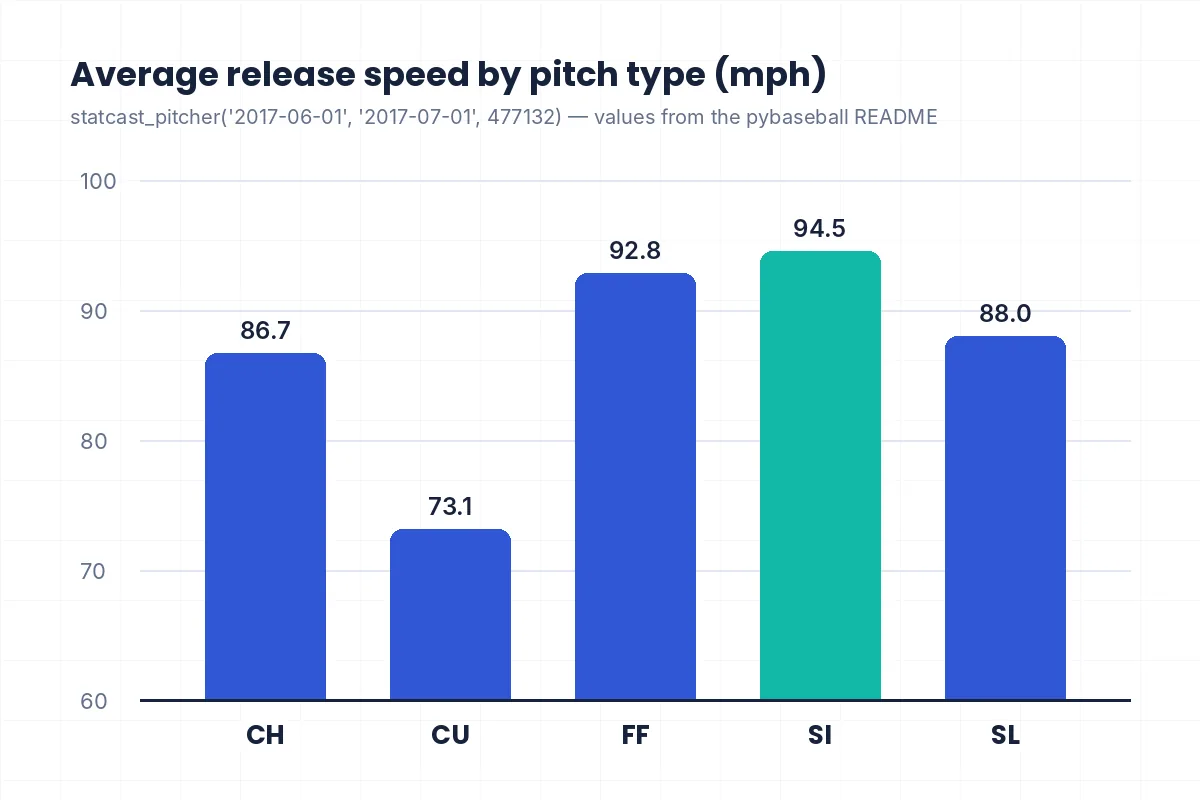
Group Statcast pitches by type, compare velocity and spin, and build pitch-mix profiles for any pitcher.
Fantasy baseball research
Pull recent date ranges with batting_stats_range() to spot hot streaks before your league does.
Sabermetric and academic research
Collect multi-season FanGraphs data with one call and keep your analysis reproducible in code.
Data journalism and blogging
Back up an article with real numbers, then export a clean table or chart for readers.
Teaching Python and data science
Baseball data is a friendly way to practise pandas: filtering, grouping, joining and plotting.
Dashboards and side projects
Feed DataFrames into a notebook, a web app or a scheduled report that refreshes itself.
TROUBLESHOOTING
pybaseball not working? Start here
These are the problems documented in the README and the GitHub issue tracker. For step-by-step fixes read pybaseball not working: common errors.
BrokenProcessPool error
Wrap the Statcast call in if __name__ == '__main__':. This is needed on systems that start new processes with spawn, often Windows and macOS.
Empty results for a date
If you queried a future date with the cache on, empty data was saved. Run cache.purge() and query again.
Statcast pulls are slow
Each season has over 700,000 pitches. Request smaller date ranges, filter to one player, or enable the cache for repeat runs.
GitHub API rate limit
Retrosheet requests check GitHub, limited to 60 per hour without a login. Set a GH_TOKEN environment variable for 5,000 per hour.
ValueError: columns passed
A source website changed its layout. Update pybaseball, try the GitHub version and check the project's issues page (see issue #384).
pip install pybaseball fails
Upgrade pip with python -m pip install --upgrade pip, use a virtual environment and confirm you are on Python 3.
SECURITY AND PRIVACY
Install safely and know what stays on your machine
pybaseball is open source, so anyone can read the code before installing it. A few habits keep your setup clean.
- Install only from PyPI or github.com/jldbc/pybaseball, and check the spelling of the package name
- Use a virtual environment so dependencies don't clash with other projects
- pybaseball needs no account, password or API key for its main data sources
- Keep personal GitHub tokens in an environment variable, never inside shared notebooks
- Respect the terms of use of the websites the data comes from
Where does cached data live?
Only if you turn caching on, pybaseball saves downloaded tables to:
~/.pybaseball/cachePoint the PYBASEBALL_CACHE environment variable to another folder to move it, or call cache.purge() to delete everything.
ALTERNATIVES
pybaseball alternatives worth knowing
pybaseball already wraps several of these sources. The others are useful when you work in R or need data pybaseball doesn’t cover.
| Tool | Language / format | Best for |
|---|---|---|
| baseballr | R | Same kind of data for R users; it inspired pybaseball |
| MLB-StatsAPI | Python | Wrapper for MLB’s own Stats API: schedules, boxscores, rosters |
| Baseball Savant search | Web | Point-and-click Statcast searches with CSV export |
| Lahman database | CSV / SQL | Historical season stats going back to the 1870s |
| Retrosheet | Raw files | Play-by-play and game logs for historical research |
USER REVIEWS
What pybaseball users say
Used pybaseball for a project? Send us your experience through the contact page and we may feature it here.
[Placeholder] Replace this text with a genuine review from a real pybaseball user, used with their permission.
[Reviewer name]
[Role, e.g. analyst or student]
[Placeholder] Replace this text with a genuine review from a real pybaseball user, used with their permission.
[Reviewer name]
[Role, e.g. analyst or student]
[Placeholder] Replace this text with a genuine review from a real pybaseball user, used with their permission.
[Reviewer name]
[Role, e.g. analyst or student]
FAQ
pybaseball frequently asked questions
Quick answers about the pybaseball download, installation and everyday use.
Download, Installation & Licensing
Is pybaseball free to download?
Yes. pybaseball is open-source software released under the MIT License. You can download it from PyPI with pip or clone it from GitHub at no cost, and use it in personal, academic or commercial projects as long as you keep the license notice.
How do I install pybaseball?
Open a terminal and run pip install pybaseball. It’s best to do this inside a virtual environment so the package and its dependencies stay separate from other projects. In Jupyter or Google Colab you can run the same command in a notebook cell.
Is there a pybaseball .exe or desktop app?
No. pybaseball is a Python library, not a desktop program, so there is no .exe, .dmg or installer. You need Python 3 installed, then you add pybaseball with pip and use it from scripts, the Python shell or notebooks.
What is the latest version of pybaseball?
The latest release on PyPI is version 2.2.7, published on 8 September 2023. The GitHub repository may contain newer fixes that haven’t been released yet; you can install that code with pip install -e . after cloning.
Which Python versions does pybaseball support?
The package classifiers list Python 3.8, 3.9, 3.10 and 3.11. It may install on newer releases such as 3.12, but those aren’t officially listed yet, so test them in a virtual environment before relying on them. Python 2 is not supported at all.
Should I install from PyPI or GitHub?
PyPI is the stable choice and the easiest to keep updated. GitHub gives you the newest code, which helps when a data source changed and a fix is merged but not yet released. Many users start with PyPI and switch only when they hit a known bug.
Does pybaseball work on Windows and Mac?
Yes. pybaseball runs anywhere Python 3 does, including Windows, macOS and Linux. On Windows and macOS you may need to wrap large Statcast calls in an if __name__ == '__main__': block to avoid multiprocessing errors.
Can I use pybaseball commercially?
The MIT License allows commercial use of the code. The data is a separate question: it comes from sites such as FanGraphs, Baseball Reference and Baseball Savant, so check each site’s terms before publishing or selling data you collected.
Features, Security & Troubleshooting
Where does pybaseball get its data?
It collects data from Baseball Savant (Statcast), FanGraphs and Baseball Reference, and also uses the Lahman database, the Chadwick Bureau player register and Retrosheet. pybaseball itself doesn’t host data; it fetches it from these sources when you call a function.
Do I need an API key?
No API key or account is needed for the main functions. The one exception is optional: Retrosheet-related requests use the GitHub API, which allows 60 unauthenticated requests per hour. Setting a GH_TOKEN environment variable raises that limit to 5,000.
Is pybaseball safe to install?
pybaseball is open source and its code is public on GitHub, so it can be reviewed by anyone. Install it only from PyPI or the official jldbc/pybaseball repository, double-check the package name and use a virtual environment to keep your system Python clean.
Why is my Statcast query so slow?
Statcast records every pitch, and a single season contains more than 700,000 of them. Pulling long date ranges means many requests. Ask for shorter windows, use statcast_pitcher() or statcast_batter() for one player, or enable the cache for repeat runs.
How do I fix BrokenProcessPool?
This error comes from parallel Statcast requests on systems that start processes with spawn, which is common on Windows and macOS. Put your code inside if __name__ == '__main__': and run the script again. The README lists this exact fix.
Why did I get empty data for some dates?
If the cache is on and you request a future date, pybaseball stores an empty result for it. Later queries then reuse that empty file. Run from pybaseball import cache and cache.purge(), then request the data again.
What is the pybaseball cache?
It’s an optional local store that saves downloaded tables so repeated queries load from disk. It is disabled by default. Turn it on with cache.enable(); files go to .pybaseball/cache in your home folder unless you set PYBASEBALL_CACHE.
Where can I get help with pybaseball?
Start with the docs folder in the GitHub repository. Report bugs on the GitHub issues page and join the community Discord linked from the README for questions. People also discuss pybaseball on Reddit baseball analytics communities.